Taskachu
THE AI CO-FOUNDER FOR SOLO FOUNDERSDoesn't sleep, doesn't eat, just shipped

You're not solo
anymore.

Take control of your AI team →Free forever · 7-day Pro trial, no card
MCP-native — agents read and write your boardProject context indexed and reachable from any agentFree forever for solo founders
app.taskachu.com / todaylive preview

Your co-founder doesn't sleep, doesn't eat, and just merged a PR.

Taskachu is the shared workspace Claude, Cursor and Codex all read from and write to — your always-on co-founder.

0
founders building
0
workspaces launched
0
MCP handoffs / 30d
0
tasks shipped
From thought to ship

Start with a thought.
Ship while it builds.

01

Discover your idea, transform abstractions to knowledge base

Half-sentence in. Brief, decisions, and acceptance criteria out. Your project memory grows with every drop.

02

Generate a backlog and execute with your favorite AI coding tool

Tasks decompose, prioritise, and flow straight into your development workflow with full context attached.

03

Run marketing while the product is being built

Creatives, content, launch prep — drafted in your voice in parallel with the build, not after it.

01Key features

One system. One context.
One execution loop.

Eight primitives, one continuous loop. Each surface is built around the same idea: keep your AI in context, and keep your hands on the keyboard.

01 · IDE execution

Direct execution in your IDE.

Send tasks with full context directly into your development workflow. Brief, decisions and linked docs travel with the task — the first response is already on-spec.

MCP● connected · taskachu
@context · 12 docs · 3 decisions
handoff · TKA-031 · Stripe checkout
Claude Code · session ready
MCPConnected
02 · Knowledge base

Knowledge that compounds.

Markdown docs with hierarchy and a BlockNote editor. Decisions, briefs, runbooks, brand notes — written once, retrieved by every agent you delegate to. Stop pasting from Notion every morning.

📁architecture · 12 pages
@decisions · 2026-q2-stack
@runbooks · incident-response
@brand · voice + tone
MarkdownHierarchical
03 · Smart backlog

Always the right next task.

Ideas decompose into tasks automatically. The AI ranks impact vs. effort and surfaces what to ship today.

P1 · Top pickToday
04 · Handoff context

Everything your AI needs, already in context.

Every handoff to Claude carries the task, the linked docs, and the decisions that shaped it — so the first reply is already on-brief.

Auto-contextOn by default
05 · RAG · Ask Taskachu

Your AI never forgets
your startup.

Workspace-scoped retrieval over every doc, card and decision. Ask Taskachu in-app or reach the same RAG from Claude Code / Cursor over MCP — no copy-paste.

@docs/pricing.md · chunk_07
@decisions/2026-04-stack.md
06 · DevOps · auto

Every task is validated and shipped.

Every completed task triggers your pipeline. Failures route back to the AI with the full trace — most fix themselves before you notice.

CI greenDeploying
07 · Marketing · AI

Marketing while you build.

Creative briefs, content calendars, launch campaigns — drafted in your brand voice and queued to your channels.

ContentCreative
08 · Env & secrets

Structured environments your AI understands.

API keys, environments and rotation, with a clear structure your AI can reason about without ever seeing the values.

DEV● ready
STAGE● ready
PROD● rotate · 12d

Features don't ship products. Taskachu do.

Drop in your first idea — Taskachu turns it into a backlog and hands the top card to Claude in under a minute.

Hand off your first ticket →
02The loop

Continuous execution.
Not task management.

Five steps that keep going. You drop in a thought. Taskachu plans it, helps you build it, checks it works, then helps you tell the world. And then it asks what's next.

Step 01
Capture the idea
Drop in an abstract thought. Get back a structured knowledge base — problem, solution, app architecture and marketing plan. Everything you need to launch a new product.
Step 02
Plan with AI
The backlog re-ranks itself by impact. Top of the list is always today's right move.
Step 03
Hand off to Claude
Send the task, the linked docs and the decisions to your AI coding tool or IDE. One click, full context.
Step 04
Review · close
Code is built. Review and test it. If it's good, close the task. Notes flow back into the knowledge base.
Step 05
Plan what's next
The backlog updates with what you shipped. Tomorrow's right move is already on top.

Your startup moves forward
even when you don't.

Take a walk. Read your kid a bedtime story. Sleep in.
The loop keeps running.

1workspace
instead of seven tabs
MCPnative
direct to Claude Code
RAGbuilt-in
your docs, always in context
$0/ mo
free for solo operators
Built with itself

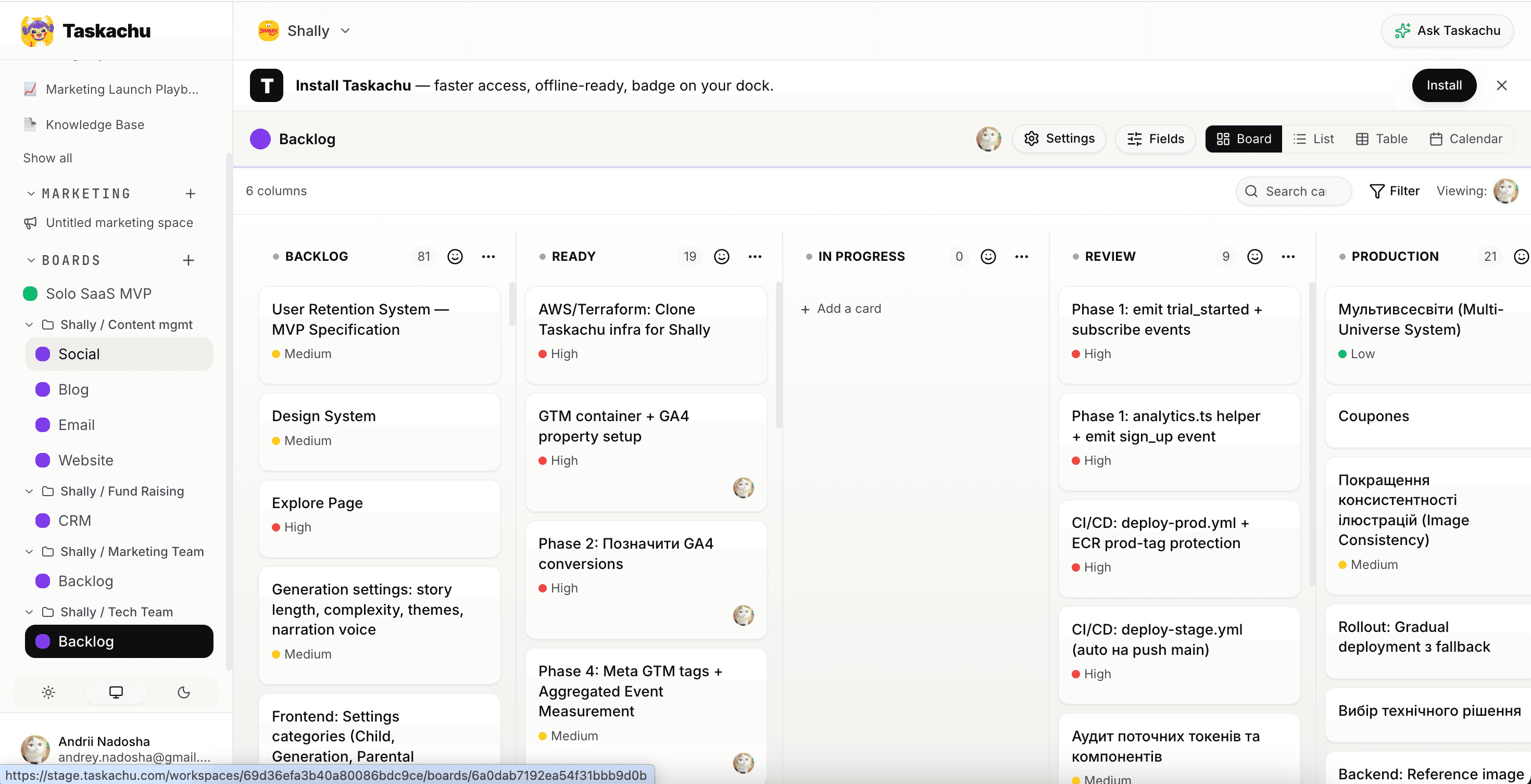
I cleared a 120-task backlog in 30 minutes —
building Shally with Taskachu.

Last Tuesday I opened my own Backlog board, asked Claude Code to pick the top priorities, and handed each card off over MCP with full context attached. Thirty minutes later, the entire 120-task backlog had moved into Complete. Auth fixes. A pricing tweak. The PWA manifest. The very landing section you're reading.

No prompt re-typing. No tab-juggling. The loop just ran.

Andrii Nadosha — building Shally with Taskachu
Taskachu Shally board with a 120-task backlog cleared into Done in one session
120
cards · Backlog → Done
~30 min
one session
1 operator
0 teammates

120 cards in 30 minutes isn't a flex. It's a Tuesday.

Open a workspace, plug Claude over MCP, ship your own backlog before lunch.

Ship your own backlog →

You are not lacking tools.
You are lacking execution.

03Why Taskachu

Three reasons
to switch.

Bring your existing work with you.
Import from Linear, Jira, Notion, Asana, Trello, GitHub Issues — or a plain CSV. Nothing left behind.
Launch your idea →⌘Jto ask anywhere
01

Ship without a team.

One workspace for backlog, docs and AI handoffs. You operate — the loop runs.

02

Always the right next thing.

The backlog re-ranks itself. Today's top card is today's right move.

03

Context, never re-explained.

RAG + MCP let every agent read your docs, decisions and board. No paste-and-pray.

04Vs. the stack you'd otherwise glue together

One loop.
Not seven tabs.

Capability
Taskachu
Linear · GitHub · Buffer · ChatGPT
Backlog auto-prioritisation
Continuous, AI-driven
Manual, per-tool
Direct Claude Code handoff (MCP)
Built-in
Copy-paste prompts
Project context (RAG)
Always loaded
Re-explain each session
Knowledge base in handoff payload
Auto-attached
Manual paste
Marketing & launch drafts
Drafted in voice
Separate tools
Tools to context-switch between
1
7+
Scales solo → small team
Same workspace
Migrate or duplicate
05Advantages
A1
No context switching between tools
One workspace. One brain. Everything stays where it was.
A2
Consistent execution
No manual overhead. The AI doesn't forget the convention you set last week.
A3
Faster iteration
Idea → plan → handoff in minutes. Less time wiring tools, more time deciding.
A4
Your product memory, always available
Architecture, decisions and brand voice — recalled, not re-explained.
A5
Scales with you
Solo today. Three teammates next quarter. Same workspace, same loop.
06Pricing

Hire your first co-founder
for $12 / month.

Solo is free forever. Upgrade to Team when you need more boards, teammates, RAG documents, and a co-founder that never sleeps. Start with a 7-day trial — no card required.

Free

Solo

For founders who want to test the loop without committing.

$0forever · no card
  • Up to 5 workspaces
  • 1 board per workspace
  • Up to 3 members per workspace
  • 10 documents indexed in RAG
  • 1,000 AI requests / month shared across workspace
  • Slack & GitHub integrations
  • Import from Linear, Jira, Notion, Asana, Trello
  • Custom fields
  • Marketing block
  • Tickets indexed in RAG
Start free →

Tag, drag, ship — all on the house.

Free forever for solo · 7 days of Pro on the house, no card

Stop dragging tasks.
Start building your startup.

Drop in your first idea, watch it become a backlog, and hand the first task to Claude over MCP — all in one workspace.

Create your startup →No card required
Taskachu mascot
07FAQ

Common questions

What is Taskachu?

Taskachu is an AI-native productivity app for solo founders. You manage projects on Kanban-style boards, and AI features (built into the app) help you decompose tasks, prioritise the backlog, run standups, and answer questions about your own workspace. Every AI feature is also reachable from Claude, Cursor, or Claude Code through the Model Context Protocol (MCP), so your AI agent can read and write the same board you do.

Who is Taskachu for?

Solo founders, indie hackers, and small teams (up to ~10 people) who use AI as part of their daily build loop. If you find yourself re-explaining your roadmap to ChatGPT every session, Taskachu replaces that friction with persistent state your AI can read directly.

Does Taskachu work with Claude / Cursor / Claude Code?

Yes. Taskachu exposes a Model Context Protocol (MCP) server at app.taskachu.com/api/mcp. Generate a workspace-scoped Personal Access Token in Settings → API Tokens, paste the snippet into your Claude Code, Claude Desktop, or Cursor config, and your AI agent can list, create, update, move, and delete cards and documents in that workspace — same surface you use in the UI.

How much does Taskachu cost?

Free tier covers one workspace with a capped monthly AI quota — plenty for an early-stage solo project. Pro is $12 per month, includes higher AI quotas, multiple workspaces, and a 7-day free trial with no credit card required.

Can I import tasks from Jira, ClickUp, or Confluence?

Yes. Each workspace has an Imports section that accepts Jira XML exports, ClickUp CSV / JSON, and Confluence HTML / ZIP exports. Imports are two-step: analyse first to see what will be created, then execute when you're happy with the plan.

What AI features are built into Taskachu?

Task decomposition (turn a card into subtasks), card prioritisation, brainstorm sessions that synthesise into board structures, daily standup planning with conversational follow-up, weekly retrospective generation, agent-export packets for handing a card or board to an external code-gen tool, and Ask Taskachu — a workspace-scoped retrieval-augmented assistant that answers questions about your own cards and uploaded documents.

Can I delete my account and all my data?

Yes. Go to Settings → Account → Delete account. We send a confirmation link to your email; clicking it permanently removes your account, every workspace you own (with cascade to all boards, cards, documents, and integrations), and cancels any active Stripe subscriptions. The process is irreversible by design.